



FAQ
FAQ(English)
I can't log in to CHOIS.
Category:
5. Online Personal Services
If you do not have the Integrated Authentication account, please enter your library card number.
If you forget password…
・ Integrated Authentication account user: Please ask at the IT Center.
・ Library card user: Please ask at the circulation desk.
What kind of personal services are available?
Category:
5. Online Personal Services
The personal services offered are broadly divided into the following three functions.
1. User Inquiry
Use this function to browse your current borrowing status, apply for an extension of the borrowing period, and change data such as personal information.
2. My Folder
This function is used to save search conditions, save search results, and browse the tag/review history.
3. Alert
This function notifies you of the arrival of new books and serials at the library.
What can I do from Your Library Record in CHOIS?
Category:
5. Online Personal Services
Renewal and export to the book management tool are both possible from the list. To do so, enter a check mark in each appropriate check box.
Click a bookmark title to check the status in detail.
Reservation
Canceling a reservation, deleting one from the list, and export to the book management tool are all possible from the list. To do so, enter a check mark in each appropriate check box.
Click a bookmark title to check the reservation status in detail.
Copy request
Canceling a copy request, deleting one from the list, and export to the book management tool are all possible from the list. To do so, enter a check mark in each appropriate check box.
Click a bookmark title to check the status in detail.
Borrowing request
Canceling a borrowing request, deleting one from the list, and export to the book management tool are all possible from the list. To do so, enter a check mark in each appropriate check box.
Click a bookmark title to check the request status in detail.
Borrowing history
Deleting an item from the list and export to the book management tool are both possible from the list. To do so, enter a check mark in each appropriate check box.
Click a bookmark title to check the borrowing history in detail.
Personal Info.
You can check and update your personal information. You can use the updated information to apply for a reservation, etc.
How do I change personal information in CHOIS?
Category:
5. Online Personal Services
Log in to CHOIS.

Click " Your Library Record"
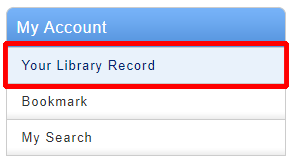
Click " Personal info"

Click " Change Personal info"
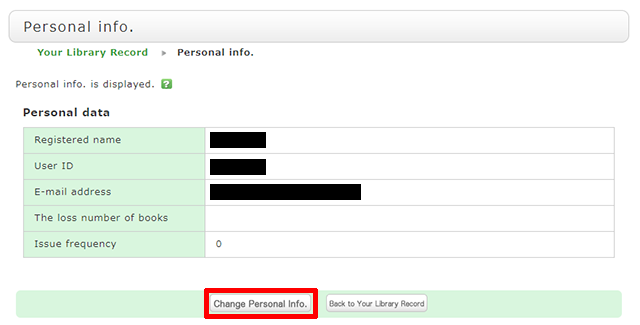
Click [Change Personal Info.] on the next screen, and make your changes. (You will be able to select the updated information, such as an e-mail address, even for a reservation, ILL copy request, and ILL borrowing request.)
What is My Folder?
Category:
5. Online Personal Services
The following functions in the MyAccount are collectively called My Folder.
That allows you to create the list of books and journals which collect from search results of CHOIS.
You can register the bibliography of books you have already read or wish to read.
You can directly export the list to "RefWorks" or "EndNoteWeb".
2.My Search
By selecting from my search, you can search with the same criteria again.