



FAQ
FAQ(English)
What should I do if the materials found with Catalogue are already loaned out?
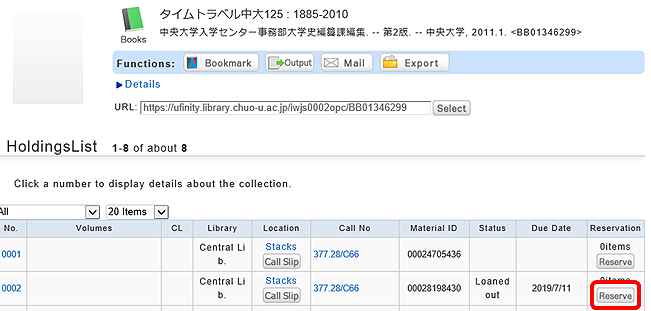
1. Click the [Reserve] button in "Holdings List" on the bibliography details screen.
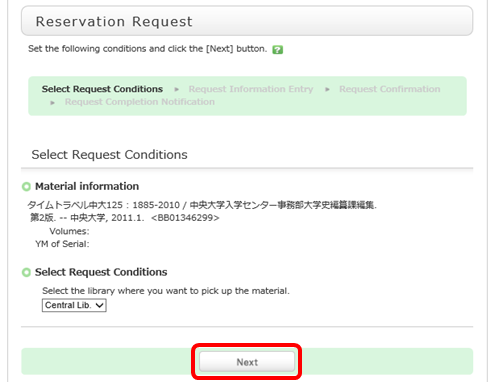
2. Select the request conditions, and click [Next] on the Select Request Conditions screen.
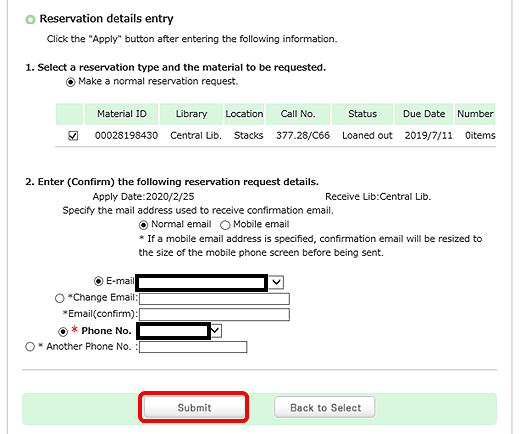
3. Confirm the material information and reservation client information on the request information entry screen. Then, enter (confirm) reservation details. Lastly, click the [Submit] button.
E-mail:From your registered e-mail addresses (PC/mobile phone), select a contact e-mail address. The library uses it to inform you when your reserved materials are available for check-out. To be contacted at a different e-mail address, fill in the "Change E-mail" field.
※The announcement about the arrival of your reserved materials is e-mail only. If you want to receive the announcement, please fill in e-mail address necessary.
Telephone number (Required input field): Type in your contact telephone number. The library uses it If the library has to contact you as soon as possible.
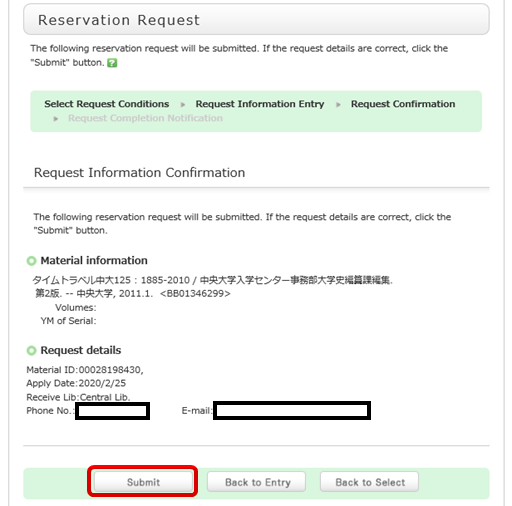
4. Confirm your reservation request details on the request confirmation screen, and then click the [Submit] button.
5. The reservation is complete when the request completion notification screen appears.
*Please note that in some cases the reservation service is not available.
Reserved materials are on hold for a period of time.
If you do not borrow the materials within this period, the reservation is canceled. So when the library contacts you about the arrival of your reserved materials, visit the library as soon as possible and complete the procedure for borrowing.