


FAQ
What do I do when I want to extend the borrowing period of a loaned out book?
Category:
3. How to Reserve, Renew the books
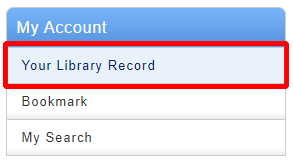
1. Click "Your Library Record" and log in to CHOIS.
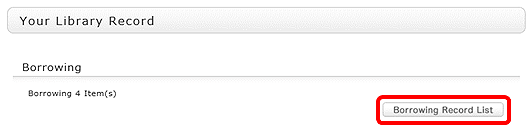
2. "User Inquiry" appears after login. Click "Borrowing Record list" .
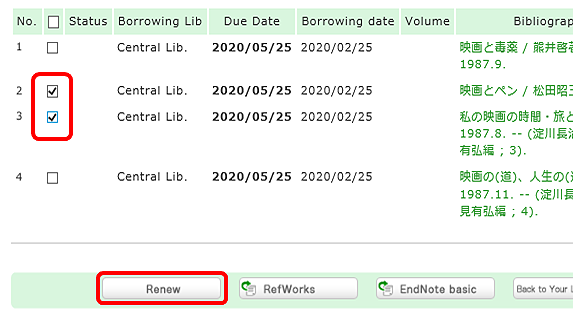
3. "Borrowing list" appears. Place a check mark beside each material you want to renew, and click [Renew]. In "Borrowing list," you can check the borrowing status: where (borrowing library), what (bibliography information), and when (Due Date).
In "Borrowing list," you can check the borrowing status: where (borrowing library), what (bibliography information), and when (Due Date).
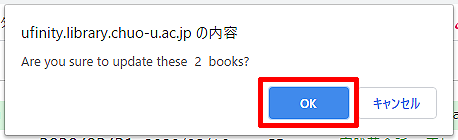
4. Click [OK] in the pop-up.
5. The update is completed when the return date is extended. If the update cannot be completed, the screen displays this fact and the reason for it.
Library Calendars
| Sun | Mon | Tue | Wed | Thu | Fri | Sat |
27 | 28 | 29 | 30 | 1 | 2 | 3 |
4 | 5 | 6 | 7 | 8 | 9 | 10 |
11 | 12 | 13 | 14 | 15 | 16 | 17 |
18 | 19 | 20 | 21 | 22 | 23 | 24 |
25 | 26 | 27 | 28 | 29 | 30 | 31 |