


FAQ
FAQ(English)
What can I find with CHOIS?
カテゴリ:
1. About CHOIS
Catalogue:
Catalogue is a database of all the University Library and Institute's materials, including books, journals, newspapers, e-books, e-journals.
*Generic name of this database is OPAC. OPAC is an abbreviation for Online Public Access Catalog.
- Basic Search:You can search for materials by either Keyword, Title, Journal Title, Author, Subject, Publisher.
- Advanced Search:You can select search fields and incorporate Boolean operators (AND, OR and NOT) between search terms in your queries.
Other Univ. :
You can search books and journals held by other universities in Japan.
It is linked to [CiNii Books] database provided by the National Institute of Informatics.
What should I do if I know only the beginning of the book title?
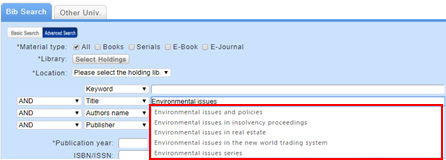
Select one from the displayed potential matches and press the [Search] button to start the search.
How do I search with an ISBN or ISSN (number)?
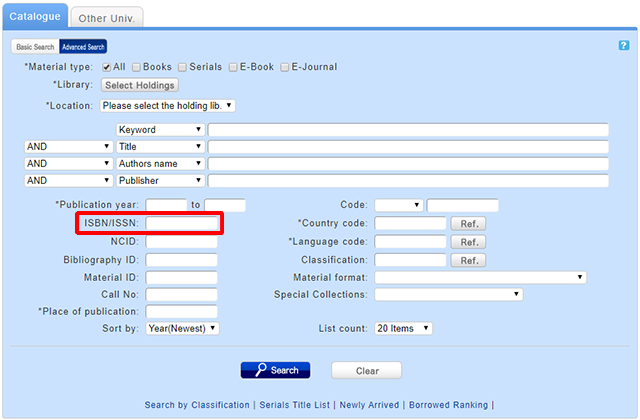
You can also perform a search simply by entering the ISBN or ISSN (number) by clicking the [Basic Search] button on the search bar of the [Catalogue] tab.

ISBN (International Standard Book Number): This number identifies a book.
ISSN (International Standard Serial Number): This number identifies a serial.
What characters can I use with the [Catalogue] tab?
For alphanumeric characters, you can enter uppercase and lowercase characters. Single-byte and double-byte characters can both be entered.
characters
Japanese Kanji, Hiragana, Katanaka,
Chinese characters (Kanji) ―Simplified and Traditional
Hangeul
Roman alphabet
Cyrillic alphabet *
Greek alphabet*
Arabic script*
Devanagari script, African languages*
Southeast Asian languages*
*Searches can also use keywords converted into Roman alphabet letters using the ALA-LC Romanization Tables of the U.S. Library of Congress. Some materials are registered in Roman alphabet letters only. An index is created for them. So if the search has no hits with the original spelling, convert the keywords into Roman alphabet letters, and perform the search again.
How do I search for materials when I don't remember the title?
Select the Advanced Search at [Catalogue] tab and enter in the Keyword field the words included in the book title or author that you can remember.
If the search has too many number of hits, you can also refine your search by material type, holding library, author, publication year, classification, subject, publisher, language on the left side of the search result list screen.
When you don't remember Kanji
When you are looking for Japanese materials and do not remember Kanji, try to search Kana - Japanese pronouncation characters.
And there is also a way to search in Roman characters instead of Kana.
Add "$" symbol to the header of each Roman alphabet keyword for search, the system automatically convert to Roman alphabet keywords into katakana keyword, and search in katakana.
When you remember part of the title
If you clearly remember a part of the title, search for the words of title you remember by enclosing it in "*" and prefix the search value by "#".
Tthe words enclosed with "#" marks , they are treated as though 1 word or a phrase.
For example:
| Search term | Description |
|---|---|
| Internet of things | Search results contain "internet" and "things" somewhere in title. |
| #*Internet of things* | Search results contain a phrase "internet of things" in title. |
You are looking for the specific subject
Click "Classification" in the lower part of the [Catalogue] tab.
For example, if you are looking for books related to "internatinal law"
You can select and narrow down the classification in the following categories,
・3:Social Sciences > 32:Law > 329:International law
And click "329", you can search and browse for books in the category.
--
If you can't find the book you are looking for, please consult the librarians at the Reference Desk .
Library Calendars
| 日 | 月 | 火 | 水 | 木 | 金 | 土 |
27 | 28 | 29 | 30 | 1 | 2 | 3 |
4 | 5 | 6 | 7 | 8 | 9 | 10 |
11 | 12 | 13 | 14 | 15 | 16 | 17 |
18 | 19 | 20 | 21 | 22 | 23 | 24 |
25 | 26 | 27 | 28 | 29 | 30 | 31 |